


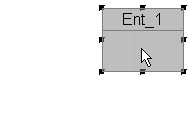
 Single-click
the new Entity object with the default pointer cursor.
Single-click
the new Entity object with the default pointer cursor. This will select the entity in standard Windows fashion, highlighting the entity's move/resize points. To move the entity, while it is selected hold the left mouse down and drag the entity anywhere on the drawing.
If you are familiar with any Windows graphic program, you already know how to use standard graphic move/resize handles. Grab one of the points to stretch the entity shape in length or height. Grab a corner to expand height and width in constant proportion.