


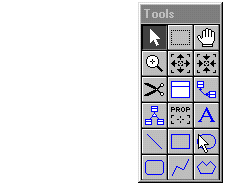
 Your
new model contains a floating Tool Palette,
which is initially in the upper left corner of the diagram window.
Your
new model contains a floating Tool Palette,
which is initially in the upper left corner of the diagram window.
You can move the Tool Palette by dragging it with the left mouse or hide|show it with F2 or the Window / Show Tool Palette. You cannot resize the Tool Palette or customize the icons which it contains.
We will show you that there are only three Tool Palette icons
which are important to building a data model and only one icon which
performs a necessary function which is not available by any other means
(e.g., function key or menu).