
07 Nov 1996 updated
PowerDesigner's use of the terms Trigger Template and Trigger are may be quite confusing, particularly since they appear in differnent window presentations yet contain the same data manipulation language (DML) material. They are the same - they are all templates from which PowerDesigner generates the actual DML output. But templates are the generic form and triggers are the specific. So we offer some definitions:
Trigger Templates are stored text blocks of SQL which include PowerDesigner meta-data variables to generate trigger DML specific to the target table(s) from generalized logic. These templates are delivered with PowerDesigner as text embedded in the DEF files for each DBMS.
Triggers, as PowerDesigner refers to them in the Table Properties window and the Dictionary; Triggers and Procedures menu, are the same trigger templates as they are applied to some specific table. If you make no change to a table trigger, then it simpy uses the existing default trigger template. However, if you make any change to a trigger withiin the context of one table, the generic trigger template is copied into the PDM and your table-sepcific changes are written into that copy.
Trigger Template Items are stored blocks of SQL which can be referenced as functions in S-Desngor trigger templates. When a trigger template is processed to generate triggers, any embedded trigger template items are expanded to include their full content. Thus trigger template items are equivalent to the classic "include module" code concept. Although trigger template items are defined in text in the DEF file, the list of template items is hard coded so that you cannot add items by defining new ones in the DEF file. However you can change the content of any trigger template item through the PowerDesigner interface under the Dictionary; Triggers and Procedures menu option. Such a a change is saved in a CDF file, as described below, and applies to all references to that template item in all models generated for that DBMS.
PowerDesigner stores its triggers (i.e., table-specific templates and global trigger templates in three different locations, depending on the condition and use of the trigger or template:
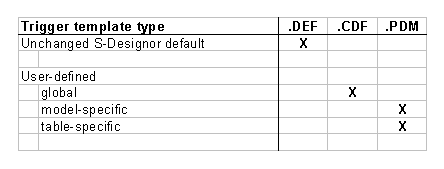
Each DBMS-specific .DEF file contains default trigger templates for each of the standard trigger events: insert, update, and delete (with separate before and after forms for some DBMS products). The PowerDesigner DEF files are plain ASCII text files found in a specific directory under the PowerDesigner installed program directory. A user with adequate knowledge of PowerDesigner and the target DBMS can modify these default trigger templates by editing the .DEF file directly in any ASCII text editor such as Notepad.
Any change made to the default triggers within PowerDesigner's trigger template editor, and specified as applying to "all modelsl", becomes a global "user defined" trigger template. PowerDesigner will immediately write a .CDF file with the same file name as the original DEF file and in the same PowerDesigner DEF directory. This CDF file is created or updated immediately when you accept the user defined changes with [OK], rather than at the time you excute File; Save.
Any changed trigger defined within PowerDesigner and applied to a single model or specific table(s) is stored within the .PDM physical model file.
: All user-defined triggers and templates stored in the PDM are blown away when you perform Database; Change Target Database and accept with [OK], even if you "change to the same database currently in effect. Your only recovery is to abandon the PDM without saving it (thus loosing all changes since your last save) and reopn it from the saved file.
Note that trigger template items are always global so they will exist only in the DEF file or, if modified, in a CDF file for the corresponding DBMS.
See also Trigger Generate check box in the Tips page
From the above you can deduce PowerDesigner's search sequence when generating trigger data manipulation language (DML):
As of PowerDesigner Version 5.1.0, we observe some apparently buggy behavior in the List of Triggers window. As noted above, as soon as you make any change to a trigger, it is noted as "user defined" by checks in the [ ] User-defined boxes.
If you attempt to remove the user defined trigger with the [Default] button, you are offered two choices. Their meaning is irrelevant because neither works! You may observe the user defined material disappearing from the trigger but notice that the check box is not cleared. If you exit the tirgger and return, it remains in the user-defined form. We conclude that the [Default] button does not work.
The way to remove a user-defined trigger is to simply uncheck the [ ] User-defined box. this brings up a dialog which asks "Do you want to delete the user-defined trigger?". If you answer [Yes], it will do that for you pronto.