

published 20 Oct 1995 : 01 Jan 1996 updated
PowerDesigner graphic objects conform to common Windows standards
for mouse manipulation. Simply click once on any object in the diagram
to select it. If you select an entity, its graphic "handles"
will be revealed:
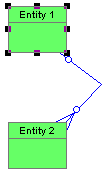
You can drag the entity by holding down the left mouse. To resize,
click on one of the handles and drag to the desired shape. See also the
"Keep Center" and "Keep
Aspect Ratio" features on the "Options" menu since these
will effect the resize behavior.
To select a relationship, click anywhere on the relationship line. While
it is not necessary to select the termination, you must put the cursor
pointer directly on the line to select it. Now the end points and any optional
bends or "elbows" are highlighted.
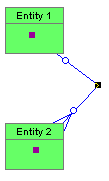
You can drag the end points around within the entity but you
cannot move them outside or to another entity (see also "Reattaching
a relationship").
 It
rarely makes sense to position the relationship termination carefully by
hand. PowerDesigner can arrange attach points
at the center of an entity. This allows the relationship line to float
around the entity as you rearrange the diagram.
It
rarely makes sense to position the relationship termination carefully by
hand. PowerDesigner can arrange attach points
at the center of an entity. This allows the relationship line to float
around the entity as you rearrange the diagram.
Copyright © 1995 Applied Information Science International; 20 Oct 1995