

published 20 Oct 1995 : 01 Jan 1996 updated
There are five standard mechanisms to access properties of PowerDesigner graphic objects in both the CDM and PDM:
Many of these properties can be accessed via more than one means. For example you can set the background color of an object from the drop-down or pop-up menus or with the tool bar.
Since each object or property may be accessible from more than one tool, which method you use is completely up to you. We encourage you to adopt one work style and ignore the other features which are redundant. No need to clutter your mind with extras just because they are there.
Each sort of object has its own native dialog box which gives access to modeled (versus cosmetic) properties of the object:
The pop-up menus are an arbitrary (not necessarily complete) collection of the most often used features about the selected object. Each of the functions on an object's pop-up menu are also available by some other means (i.e., drop-down menus, tool bar, tool box).

Drop-down menus provide access to all features and properties of every object (except for the creation of graphic objects). These are the standard Windows style menus across the top of the PowerDesigner window. While every other mechanism for accessing objects can "hide", either automatically or manually, the drop-down menu is always visible.
Sometime access through drop-down menus is obscure, deeply nested, or otherwise inconvenient, especially when compared to the shorter routes via dialog boxes or pop-up menus.

Tool bar icons are frequently the quickest way to perform "cosmetic" operations such as change colors or align objects. Each has an equivalent drop-down menu option so which method you use is your choice.
The tool bar can be hidden or revealed from the Window drop-down menu or with shift+F2.
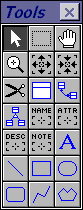 The
The


 icons
on the tool box set the cursor to a persistent
shortcut for access into the respective properties of objects. If you need,
for example, to add or review descriptions on a number entities, this can
be the quickest route.
icons
on the tool box set the cursor to a persistent
shortcut for access into the respective properties of objects. If you need,
for example, to add or review descriptions on a number entities, this can
be the quickest route.
Note that these shortcuts merely give you another access path to the same windows and properties as would double-clicking on the object to reach its dialog box.
Go to: Generate Physical Model | Instruction outline | Index/Glossary
Copyright © 1995 Applied Information Science International; 02 Jan 1996