

published 20 Oct 1995 : 01 Jan 1996 updated
When you open PDM in PowerDesigner, the window contains a floating toolbox which is initially positioned in the upper left corner. This tool box is very similar to the CDM tool box. You can hide|show this tool box with the F2 key or from the "Window" menu.
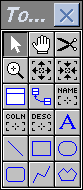
You will see that there are no tools which are essential to relational schema modeling. If you have designed your model properly in the conceptual layer, then the only functions of the PDM toolbox are "window dressing" to enhance the diagram graphically or convenient shortcuts to functions which are also available from menus and/or function keys. See also Tool Box Drawing Icons, Tool Box Move Icons, and Graphic Object Properties.
Copyright © 1995 Applied Information Science International; 20 Oct 1995