Silverrun
08 Oct 1997
|
|
|
|
|
|
|
|
|
|
|
|
||
|
|
|
|
|||
Silverrun |
||||||
|
Product Review |
|||||
|
Silverrun is a large
and deep set of tools for database modeling and
engineering. We have spent a number of weeks reviewing
its various component programs to prepare the following
discussion. At the moment Silverrun is perhaps uniquely positioned among CASE tools. It is delivered affordably on the desktop, as are PowerDesigner and ERwin. Yet Silverrun offers serious enterprise features generally found in much more expensive server based tools (e.g., ADW, LBMS's Systems Engineer). |
|||||
Silverrun integrates
the three classic fundamental data design components
based on a common presentation approach and shared design
definitions:
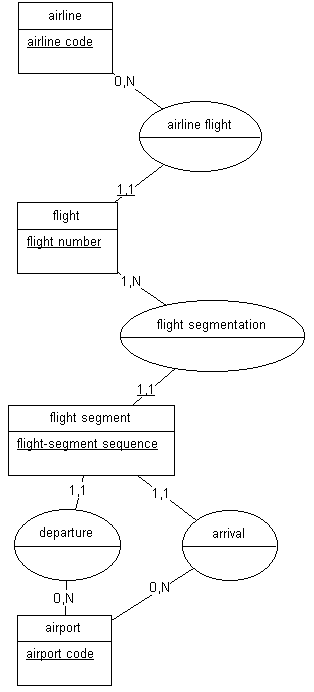
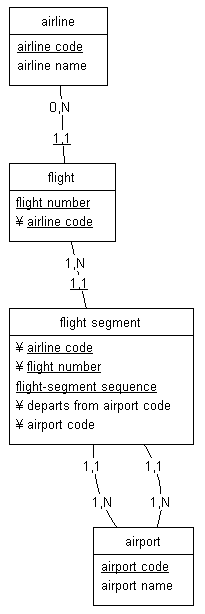
Each of these three modules is a separate product, licensed per seat. Since the per module cost is about the same as the total cost of PowerDesigner or ERwin, Silverrun can be somewhat more expensive, depending on configuration and user population. Nonetheless the cost difference alone is moderate and hardly a deterrent to enterprise scale users who may desire Silverrun's benefits. In addition, an optional Enterprise version of Silverrun (RDM only to date) joins the big leagues by working directly over a relational database dictionary. Standard versions capture a model snapshot in a proprietary file local to the user. A product facility is provided to manage the reconciliation of multiple models. The Enterprise version, on the other hand, displays each object live from its shared RDBMS dictionary (in Oracle, Sybase, ...), which handles locking, updates, and global refresh at the object level. Based on its solid foundation in methodology, depth of features, and modular integration, we would be tempted to rate Silverrun as a strong leader in the CASE data modeling field. Yet we cannot because all of us participating in this review had the same overall impression: Silverrun's style is bulky, clumsy, and slow to the point that it inhibits, rather than enables, design inspiration. We constantly felt as if we were dragging a load of discarded library books through knee-deep melting snow. Menus are very long and intimidating with unobvious choices. Tool pallets contain overlapping and confusing icons. Accessing graphic objects requires knowledge of specific tool behaviors. "Connectors" are defined separately from "Directions". A number of its internal rules are only enforced by batch procedures, rather than as real-time validations. Throughout Silverrun understanding is encumbered by extensive jargon unknown in the standard lexicon of data modeling. At a more general level, we found the methodology framework imposed by Silverrun's ERX module to be out of date and incomplete. The Chen style Entity-Relationship modeling in the ERX module forces the dated notion of "relationships" as objects separate and distinct from entities - a concept which has been discarded by most practitioners in favor of the more streamlined and understandable Information Engineering technique. Silverrun falls far short of PowerDesigner in the level of abstraction which one can employ in conceptual and physical modeling. Silverrun's sub-typing is implemented only at the physical level (RDM "Choices") and offers no flexibility in mapping conceptual sub-types into normalized or denormalized tables. Candidate keys are not supported, although their common weak side effect of "alternate keys" are. There is no facility in the ERX module to model purely conceptual entities which exteralize an attribute definition without generating a table. Several other deficiencies reinforce our opinion of Silverrun's weak abstraction. These unacceptable flaws in a basically strong product are very disappointing to us. Silverrrun provides multi-platform desktop support, excellent on-line help, extensive printed documentation, good user support policies, and, in our limited experience, robust, reliable code that performs well. If you do not share our rather strong and personal opinions on modeling style and abstraction, if you cannot work on Windows, or if you must have true interactive multi-user data modeling, then seriously consider Silverrun. |
||||||
|
Batch
procedures: for example "Cleanup",
"Validate Integrity" , "Foreign
Keys" Desktop: Of the three leading PC based products, only Silverrun also runs on OS/2, Mac, and Unix in addition to Windows. Icons: For example, the RDM basic tool palette contains three separate icons for drawing reference links, differing only in the symbol line style (i.e., curved, straight, broken). Changing the symbol line style of a link is done with an obscure key combination rather than by setting a link property. We would find this better presented by one icon to create a link and a specific link property of its line style. Jargon: for example "Combinations", "Actions", "Representations", "Components", "Characteristics"; " Choice" for the more common "Sub-type". Menus: e.g. RDM Model menu, the " Action Categories" and "Column-Action Symbols" options require a substantial study of Silverrun' s text and/or help to make sense. Tool behaviors: In the RDM a double mouse click with the pointer will access the definition dialog for the selected object. But a single mouse click with the magnifying glass cursor opens a different dialog box for the same selected object. |
|||||
|
Modeling Objects With Silverrun RDM and DFD, a paper at Stanford University | |||||
|
Silverrun Technologies, Ltd.
|
|||||
|
||||||