


ERwin 3.0
4 Mar 1998
|
|
|
|
|
|
|
|
|
|
|
|
||
|
|
|
|
|||
ERwin 3.0 |
||||||
|
by Duncan Dwelle |
|||||
|
Our
widespread personal observations reveal that there is
still only one brand name in data modeling and that is ERwin.
There must be a reason why ER/Studio, InfoModeler, PowerDesigner, Silverrun, System Architect, and almost every other data
modeling program import ERwin
models, even if no others. ERwin 3.0, with modest remodeling and several new features, still calls to mind the familiar brown UPS truck - it turns no heads by sleekness but shows up every day in almost every business. Perhaps the next version of ERwin, due shortly, will remind us more of FedEx. |
|||||
|
||||||
|
While
ERwin per se
is strictly a data modeling tool, Logic Works also
publishes BPwin,
an IDEF0 process tool, and a number of products related
to the design, coding, and implementation of database
application systems. ERwin
and BPwin
both connect to Logic Works' ModelMart
repository product for shared model storage and access. Although the details of these additional products are outside the scope of this review, it is important for you to know that ERwin exists within a larger framework of integrated and related products. |
|||||
|
||||||
|
In
our review of ERwin 2.6,
we pointed out that it lacked some important capabilities
vis a vis competitors. Let's take fresh look at 3.0: Separation of logical and physical models is fundamental in ERwin 3.0. But the actual benefits are limited so far. While there is still no way to perform selective denormalization, the new "logical only" property on entities, attributes, and relationships allows substantial differentiation of logical and physical models. Views are provided, albeit incompletely, in an attractive and simple approach. The primary editor interfaces have been refreshed and simplified. We'll expand on these issues and others below. |
|||||
|
||||||
|
In
apparent response to competitive pressures, ERwin
3.0 finally introduced separation of logical and
physical models. This is accomplished by treating the two
model forms as different representations of the same
content.
You can also
choose in the logical model to permanently convert the
relationship into an associative entity, which is the
path we strongly recommend. The biggest benefit of the separation of logical and physical diagrams is probably how the various editors are simplified. Since there are fewer properties to be shown (i.e., either logical or physical, but not both), the new editor formats are less cluttered. However, this separation makes no provision for meaningful denormalization, which is the only real reason for having separate diagram forms. Columns cannot be moved or replicated in the physical with any link to their source attributes in the logical model. Furthermore, since both logical and physical models work from the same underlying metadata, you cannot propagate one logical into multiple physical models (for different database products, configurations, or trial versions) without a crude "save as" or copy. Either of those, of course, will break the links of the new model from its origin. In the foreseeable future this architecture may lead to more useful capabilities if Logic Works can add specific denormalization transformations. Meanwhile, with these limitations we find ERwin's separation of logical and physical models to be more a workaround for poor interface design than a real modeling benefit. |
|||||
|
||||||
|
ERwin
3.0 adds a new detail feature buried as
a checkbox on the object definition editors. You can
specify a logical model object (entity, attribute,
relationship) as Logical
Only. This
will suppress that object in the physical model. In a
symmetrical fashion, there is a Physical Only property for tables, columns, and
physical relationships (foreign key references). These setting options may seem trivial but they provide several valuable capabilities. One can mark objects as Logical Only if they are in process and not yet ready for exposure to the real world. On the physical side, Physical Only provides a poor man's denormalization if you want to manually represent column moves and replications without forcing the same form in the logical model. This is also useful to model technical columns and tables from the physical side without cluttering up the logical (although we would pursue other means). While we'd like to see true normalization controls in the tool, this classification ability is very useful in its own right and is a fine addition to ERwin. |
|||||
|
||||||
|
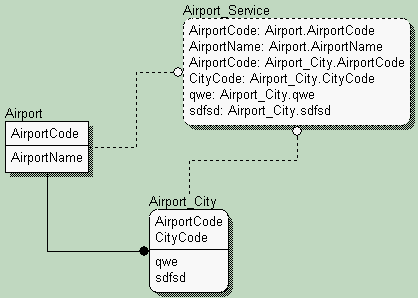 Logic Works is
very proud of their new View feature in ERwin
3.0. It is slick and simple: just
grab the View
table tool
from the tool box, drop a view symbol into a physical
model and connect it to its source tables with the View relationship tool. The resulting view is
immediately and dynamically populated with columns from
the source tables. Logic Works is
very proud of their new View feature in ERwin
3.0. It is slick and simple: just
grab the View
table tool
from the tool box, drop a view symbol into a physical
model and connect it to its source tables with the View relationship tool. The resulting view is
immediately and dynamically populated with columns from
the source tables. Unfortunately, several of the most important elements in a view are not provided. The where clause is left to the user to code. There is no provision for group by, having, or order by, all of which are fundamental to any SQL query. PowerDesigner 6.0 does a much better job here, filling in the join portion of the where clause automatically and offering tabs for the other definition components. |
|||||
|
||||||
|
ERwin
has taken a beating recently on this issue and
consequently Logic Works has done substantial rework on
the interface for 3.0. ERwin provides
improved entry of entity and attribute names directly on
the diagram surface. You can click a new entity onto the
canvas and just start typing. Go back into the editors
later to add the details. This is very simple and natural
for free-form "white-board" style input. Of
course ERwin
still allows very easy attribute movement with the tool
box hand icon. Nonetheless, we think that ERwin is still neither pretty nor friendly once you dive into the dreaded editors. You can navigate from the attributes of an entity to the descriptive properties of that entity but not the other way around. Adding an attribute in the editor imposes another dialog box on top of the one you're in, rather than accepting entry into a grid or list. The multiple Display levels and Editor styles remain ERwin's most confusing aspects. As noted in our last review, every window is organized differently. Many options, even important concepts, only appear as obscure buttons nested several windows deep. Some are now only available from the right mouse menu. There is no apparent design pattern or template from which new features are added or old ones enhanced. We find it inappropriate that the tool which claims to be the leader in database design cannot do a better of interface design. As we said before, if you want to learn ERwin, you're going to do it the hard way - by banging your fingers on keys and your head against the wall On the other hand, ERwin's manuals and help are generally excellent - well organized, well written, and providing extensive discussions of concepts with examples. Feature creep has gotten ahead of the indexing (both printed and on-line) so it is often a goose chase to look up a specific feature. But when you find it, the explanation will probably be clear and complete. On balance, we continue to rate ERwin as clumsy and ugly but entirely usable. |
|||||
| We can think of a lot more to say about ERwin but right now the dog needs a walk and I need lunch. This space will expand as we have time to discuss ERwin's DDL and DML controls, its much ballyhooed complete compare features, reporting, the metamodel, and many other aspects. | ||||||
|
||||||
|
We are more impressed with LogicWorks, the company than with ERwin, the product. We don't like IDEF1X or ERwin's clunky interface. We do like its rich set of well built, reliable features. If this mix works for you, you can't go wrong. And we look forward to Logic Works' next edition. Maybe the face will get prettier eventually ... | |||||
|
||||||
|
For
two years AIS made available a mailing list server for
open discussion of all issues about the ERwin
product line. Now we've passed host duties over to InfoAdvisors.To subscribe:To fetch the archive of all prior messages: |
|||||
|
Logic Works
|
|||||
|
||||||
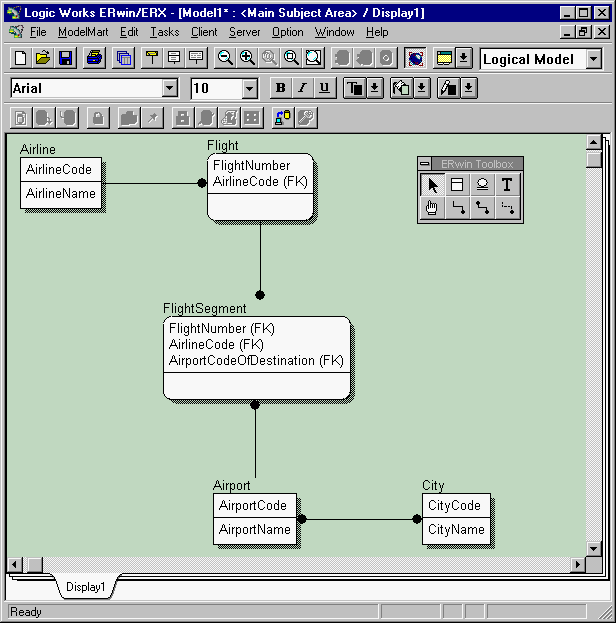

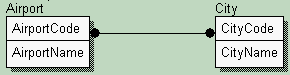 For example, many-to-many
relationships now appear immediately in the physical
model as associative tables when you select Physical Model from the menu drop-down list.
For example, many-to-many
relationships now appear immediately in the physical
model as associative tables when you select Physical Model from the menu drop-down list.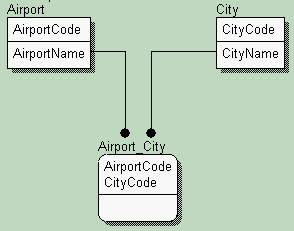 An associative table can have columns added
which will not be represented in the logical many-to-many
relationship (a very questionable practice in our
opinion).
An associative table can have columns added
which will not be represented in the logical many-to-many
relationship (a very questionable practice in our
opinion).