

published 20 Oct 1995 : 01 Jan 1996 updated
Now that we have created a simple skeleton conceptual model, let's try to turn it into something a DBMS can understand. This is why PowerDesigner is built on a "two layer" architecture. The conceptual model captures your view of the real (or business) world; the physical model translates that into a relational data schema specific to your chosen DBMS product (Oracle, Sybase, DB2, Informix, etc.).
From the drop-down menus, select Dictionary/Generate Physical Model. If you have not yet saved your model, a dialog box will give you a chance to do so now but there is no need. When the dialog box below appears, ignore almost all of the fields for now and accept their defaults.
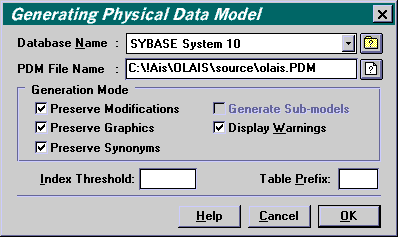
You will need to select a target Database Name
from the drop-down list  .
Then click on OK to begin the generation. We'll discuss later what
controls this process but for now, take a look at the next page ...
.
Then click on OK to begin the generation. We'll discuss later what
controls this process but for now, take a look at the next page ...
Go to: Conceptual Model Verification | Instruction outline | Index/Glossary
Copyright © 1995 Applied Information Science International; 20 Oct 1995