

 The
" Relationship Icon" turns on the tool which draws relationships
between any pair of entities. PowerDesigner only allows binary and
unary relationships. For more explanation see the discussion of how methodologies
deal with relationship arity.
The
" Relationship Icon" turns on the tool which draws relationships
between any pair of entities. PowerDesigner only allows binary and
unary relationships. For more explanation see the discussion of how methodologies
deal with relationship arity.
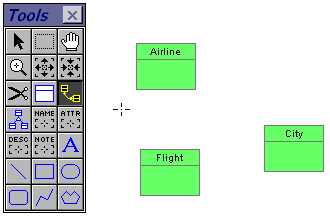 To
place a new relationship on the CDM, click this icon. The cursor changes
into the relationship cross hairs shape.
To
place a new relationship on the CDM, click this icon. The cursor changes
into the relationship cross hairs shape.
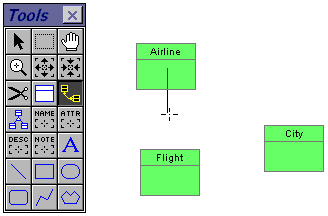 Click
on one of the entities which you want to relate. Hold the left mouse and
drag the cross hairs toward the other entity to be related.
Click
on one of the entities which you want to relate. Hold the left mouse and
drag the cross hairs toward the other entity to be related.
Notice that if you release the mouse button before reaching another
entity, a partial relationship line is shown to the point of release. This
is handy when you want to put bends in the relationship line (although
it can be done latter just as easily).
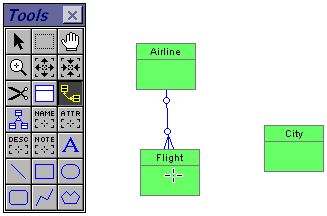 Move
the mouse over the second entity and click to complete the relationship.
A completed relationship line, including default terminations, appears
immediately.
Move
the mouse over the second entity and click to complete the relationship.
A completed relationship line, including default terminations, appears
immediately.
By default this relationship is one (optional) at the first entity and many (optional) at the second entity. All of these properties can be easily changed with a double click to reflect your design.
 If
you already know the relationship is a one-to-many before you draw it,
then let the default be a short-cut by selecting the "one" entity
first. This will save you a few steps later in rearranging the default
relationship.
If
you already know the relationship is a one-to-many before you draw it,
then let the default be a short-cut by selecting the "one" entity
first. This will save you a few steps later in rearranging the default
relationship.
(There is a side benefit in that PowerDesigner places the first entity selected on the top of the relationship definition dialog box and the second entity on the bottom. If you make a habit of drawing from the "one" to the "many" then your relationship dialog boxes will all fit the same pattern of one on top and many on the bottom.)
To get rid of the relationship cursor  ,
move your cursor the top left corner of the tool box and click on the arrow
icon
,
move your cursor the top left corner of the tool box and click on the arrow
icon  .
This will restore the default selection arrow cursor.
.
This will restore the default selection arrow cursor.
A
shortcut to clear any icon special cursor is to single-click on the right
mouse. This is the same as selecting the arrow icon in the tool box. To
restore the last used special cursor, double-click the right mouse.
Go to: Instruction outline | Index/Glossary
Copyright © 1995 Applied Information Science International; 20 Oct 1995