ER/Studio 2.5
02 Mar 1998
|
|
|
|
|
|
|
|
|
|
|
|
||
|
|
|
|
|||
ER/Studio 2.5 |
||||||
|
by Duncan Dwelle |
|||||
|
 ER/Studio
2, replacing Embarcadero's ER/1,
is available
for evaluation and purchase. We have been using the product for several
months, since early beta, and offer the following review
based on extensive real work. ER/Studio
2, replacing Embarcadero's ER/1,
is available
for evaluation and purchase. We have been using the product for several
months, since early beta, and offer the following review
based on extensive real work.Click the image (or any other in this review) to see it full-size. |
|||||
|
||||||
|
ER/Studio 2 is clean,
fresh, and inviting. Since its original ER/1
version, this product has shown promise of setting new
standards of usability in data modeling. We continue to
rate it substantially more attractive and intuitive to
use than ERwin (its most direct analog), InfoModeler, PowerDesigner, Silverrun, System Architect, or any of the other widely used data modeling tools. ER/Studio was originally offered as a limited implementation of IDEF1X methodology. Expanding on its solid IDEF1X start, in this second release ER/Studio is now better than what ERwin offers in its sixth year. Furthermore, ER/Studio reaches into the broader territory of PowerDesigner with IE notation, optional straight relationship lines, and separate logical and physical models. Embarcadero Technologies is widely respected among serious database shops for its DBArtisan tool which manages multiple databases from one desktop. This database expertise is surfacing in ER/Studio's very solid and thorough approach to every aspect of DDL generation and reverse engineering. While a few features are not yet here (e.g., user constructed views), we interpret their absence as indication that Embarcadero (unlike the software industry as a whole and some competitors in particular) releases code only when it's done. Altogether, ER/Studio 2 is not just a new release - it's a new product. Reliability and performance are excellent; presentation is setting new standards; advanced modeling and database features are growing rapidly as this handsome youngster matures. |
|||||
|
||||||
|
ER/Studio
operates on models, each of which is stored in
Embarcadero's text file format with a DM1 extension. Each
model contains one logical diagram and any
number of physical diagrams. ER/Studio
thus provides truly separate, linked logical and physical
models - a major step forward for Embarcadero and a
capability shared by few other tools. Unlike ERwin 3.0 or PowerDesigner 6.0, ER/Studio allows multiple physical diagrams attached to a single logical, and each physical can be modeled over the same or different DBMS product. A model can also be saved as a MS Access format MDB database for query or external manipulation. As in every proper data modeling tool, each object (entity, attribute, relationship, etc.) is defined only once, no matter how many times it may be represented. Like ERwin, ER/Studio adheres to IDEF1X concepts in allowing attribute definitions only in the context of an entity. Thus if you delete an attribute, its definition is lost and must be re-entered. Domains can and should be used effectively to cast shared properties over multiple attributes. Another direct aspect of the IDEF paradigm is ER/Studio's immediate propagation of foreign keys in both logical and physical models. Each diagram is organized into what are called (perhaps a little confusingly) the Main View, containing by default all modeled objects, and any number of user created Sub-Views. The later correspond to subject areas in ERwin and sub-models in PowerDesigner. Sub-Views allow arbitrary diagram contexts for focus and presentation of specific issues. They are many-to-many with modeled objects, meaning that any entity (or table) can appear in any number of Sub-Views. Since each entity (or table) exists only once as a definition set, any change is immediately reflected in all Sub-Views. Users of ERwin and PowerDesigner will be familiar with this method of visually organizing a model. Logical and physical diagrams can be generated and synchronized in both directions via simple wizard dialogs with extensive control over how added/updated/deleted objects are propagated. Logical to physical transformations are limited to exploding many-to-many relationships into associative tables (the same as ERwin 3.0). No other transformation controls for selective denormalization, replication, table splits, etc. are yet included. |
|||||
|
||||||
|
Embarcadero
has poured talent and imagination into giving ER/Studio
2 a fresh way, albeit Win95 adherent, of
presenting itself to the user. While every function is
available from the concise and well organized text menu,
there are also two sizable, dockable toolbars with icons
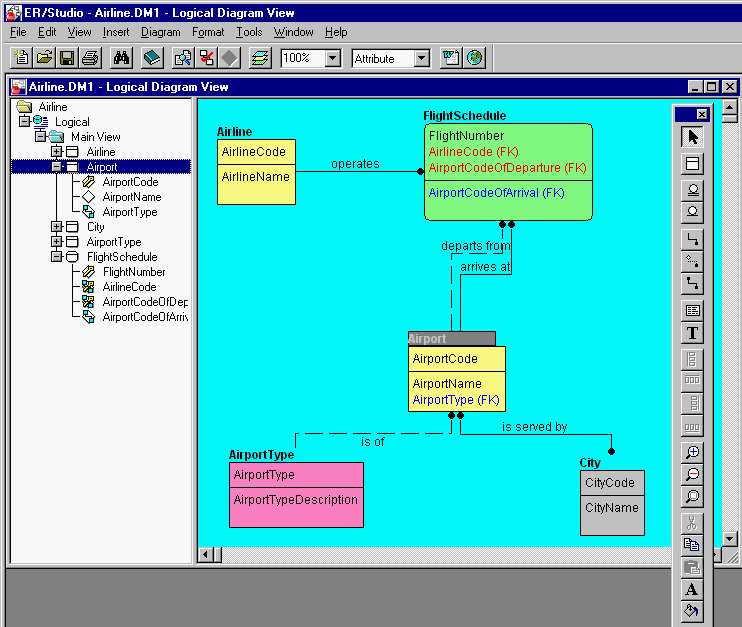
for nearly every modeling task. Carrying on with Win95 GUI style, ER/Studio splits each MDI model window into a tree browser on the left and the diagram itself on the right. Since the divider between is movable, one need not fear loosing precious diagram space to unwanted accessories (at least not on my 21" monitors). But the tree will hardly be unwanted; in fact it's very useful, practically indispensable. Since the tree lists each diagram (logical and physical, complete or sub-view) in a model, you can instantly scan and activate any diagram from the tree. In the same fashion, if you expand the listing for a diagram, all its entities (or tables in the physical) are listed. Notice in the screen shot above that I've selected Airport in the tree. It is simultaneously selected in the diagram and its attributes are expanded in the tree list. Neat, intuitive, and very useful. Another unique and powerful navigation feature is the Zoom Window - a small resizable window floating on top which acts as a dynamic magnifying glass for the diagram region under the cursor. When Embarcadero adds in-place editing (full on-screen editing of entity and attribute names is included in V2.5) this will be absolutely tops among ER tools for object definition. Naturally a double-click on any object brings up its appropriate property dialog. These make good use (improving steadily) of tabs to reveal all categories of content on a single plane, minimizing the dreaded nested dialog syndrome. ER/Studio challenges the historic leader in graphic manipulation - PowerDesigner - for first place honors in speed and smoothness of zoom, scroll, and move. These may seem trivial but if you are staring at the monitor all day, those half-seconds waiting for a zoom really add up and wear you out. |
|||||
|
||||||
|
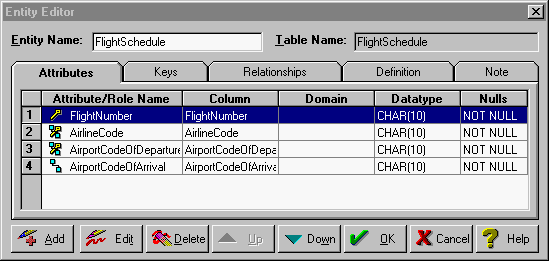 There is
nothing remarkable about how you place an entity into an ER/Studio
diagram with a single click of the entity icon. By now
nearly every data modeling product has got that much
sorted out. The nice part is that subsequent edit
operations on the entity or its attributes are just as
direct. Double-click the entity; select a tab of Attributes,
Keys, etc., and click the property you want to
edit. There is
nothing remarkable about how you place an entity into an ER/Studio
diagram with a single click of the entity icon. By now
nearly every data modeling product has got that much
sorted out. The nice part is that subsequent edit
operations on the entity or its attributes are just as
direct. Double-click the entity; select a tab of Attributes,
Keys, etc., and click the property you want to
edit. An obvious display mode drop-down list in the menu bar lets you set the amount of detail displayed in the diagram: entity name only, all attributes, primary keys, all keys, ... ER/Studio joins the growing list of tools (from which PowerDesigner is most conspicuously missing) which support proper relational key definition in a logical model. This means that you can define any number of keys - one or more attributes which must be unique - in the logical model. Domains and user defined types are well supported, although not as cleverly integrated into attribute editing as I would like. The term Data Dictionary is applied to an editor for Defaults, Rules, User Datatypes, and Domains. Although this piece works adequately, it has the feel of an afterthought and is not visually connected to the rest of the product. |
|||||
|
||||||
|
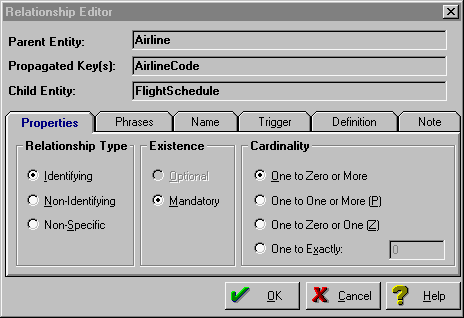 ER/Studio tackles ERwin's home turf and does it much better in relationship definition. As you can see above, ER/Studio takes its form straight from Bruce, the bible of IDEF1X. Even those of us more partial to IE or other schools will (perhaps reluctantly) get used to this quickly because the presentation is so obvious. Multiple overlapping foreign keys are handled well through role name assignment. Changes to PK attributes are immediately inherited to any corresponding FKs. If you are not terribly fond of the obscure dots and diamonds of IDEF1X, the Diagram Options dialog switches to IE crow's feet with a radio button. ER/Studio's greatest visual gaffe is its weak handling of relationship lines. Entity terminations dock awkwardly; lines may cross needlessly; little line position control is possible; relationship labels cannot be moved (complete control is provided in V2.5). Embarcadero is well aware of these deficiencies and promises relief soon. |
|||||
|
||||||
|
Generating
DDL in ER/Studio flows through
a careful wizard with six helpful pages of database
expertise. I'm not enough of a DBA to vouch for the
quality of the DDL, nor do I have convenient access to
all twenty-two DBMS products supported. Here's where
Embarcadero Technologies established reputation for
expert database maintenance holds promise of reliable and
efficient DDL. You can select the tables to generate;
control primary and alternate keys and FK referential
integrity constraints; create storage structures;
generate single-table views and CRUD stored procedures;
output script or run on the fly via ODBC. Judging from our extensive experience with demanding clients who use PowerDesigner, ERwin, and other tools, ER/Studio's DDL generation capability is solid, fast, flexible, but not yet as fully featured as some heavy duty shops may need (e.g., no variablized constraint names). One absolute lack is trigger templates - there are none. ER/Studio, if asked, generates its own trigger code to enforce referential integrity. If you must have more or different triggers, don't look here yet. |
|||||
|
||||||
|
Reverse engineering into ER/Studio is a snap - wizard driven and very fast. Any defined ODBC data source is available. Just login and go. I personally have not tested this on obscure configurations with, for example, declarative uniqueness constraints on Oracle columns. There are thousands of possible situations which must be handled for reverse engineering to be "complete'. But only a few cover the vast majority of daily needs. Based on my experience with the rest of the product, I'll bet those work exceedingly well. | |||||
|
||||||
|
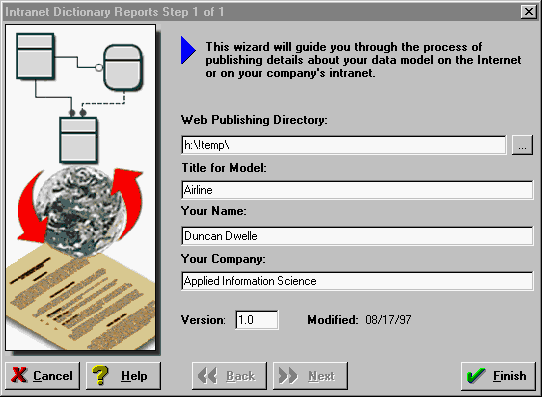
ER/Studio
makes its model content very accessible in several ways.
Conventional reports can be issued through a simple
wizard. Their scope and layout are limited but adequate
for the basics.
(To be fair, AppModeler runs dynamically from the PowerDesigner MetaWorks repository while ER/Studio is publishing static content. On the other hand, MetaWorks' content is itself static since it requires a batch consolidate to be refreshed from models.) If you insist in complete control over report output, simply save the model as a MS Access MDB file and hack at it with the query or database tool of your choice. And you can copy any portion of an ER/Studio diagram into an OLE enabled container application (e.g., MS Word) then edit in place - just the way OLE server programs are supposed to work! |
|||||
|
||||||
|
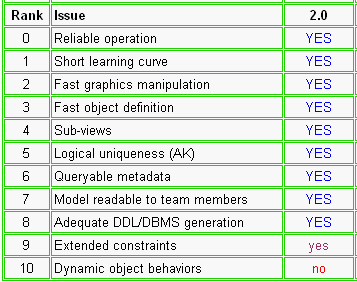 With every tool in the market
sitting on our shelf, I chose to use ER/Studio
on a major new project for a substantial software vendor. With every tool in the market
sitting on our shelf, I chose to use ER/Studio
on a major new project for a substantial software vendor.
This was not a casual choice. I reassessed familiar tools (ERwin, InfoModeler, PowerDesigner, Silverrun, System Architect) in which I am expert, tried a sample model through a number of products, and ended up with a decision table (fragment at right) which led to choosing ER/Studio for the project. |
|||||
|
Embarcadero Technologies
|
|||||
|
||||||