


PowerDesigner
04 Sep 1997
|
|
|
|
|
|
|
|
|
|
|
|
||
|
|
|
|
|||
PowerDesigner |
||||||
|
Conceptual Data Model | |||||
|
||||||
There might be three
starting points for a new CDM:
The last is the most common approach. DataArchitect is fast and facile at this. Click the entity tool in the tool palette, click on the drawing, and start defining. This is the part which seduces so many new users. It's so easy it's fun. We often model in the heat of a JAD session with users and manage to keep pace with their conversation (to be sure, not all of it deserves modeling so we catch up during gossip). DataArchitect's data items are a central example of the CDM's abstraction mechanisms.. As in IEF, each underlying definition of a value holder - analogous to a column - is named and defined independently of its usage in any entity. Such an object is a data item. These are then associated with zero or more entities where each association becomes an attribute - merely the association of one data item with one entity. This method allows central data item definitions to be used to support any number of attributes. Change one and they all change. And that's what confuses new users; the DataArchitect Attributes of Entity xxx window does not explain that these Attributes are merely instances of centrally defined data items. PowerDesigner now has several poorly documented features on the Model Preferences dialog to configure how data items behave. In the end, this powerful abstraction is often a distraction and detraction from the main task. Many organizations choose to insist that one attribute is one data item and visa-versa. The actual task of defining an attribute, I mean a data item, or what ever it's called, is very transparent. The standard grid entry form appears throughout PowerDesigner where ever a list of objects can be manipulated. You enter critical values (name, datatype) directly into the list. Additional form areas at the bottom, tabs, and command buttons reveal additional properties. We rate creating entities and their attributes in PowerDesigner as among the best in class, tied with ER/Studio and better than ERwin, InfoModeler, Silverrun, System Architect, and the others. On the other hand, PowerDesigner lacks one significant feature in defining the content of a logical model. It has no provision for alternate keys, i.e., uniqueness constraints other than the primary identifier. Since uniqueness, aside from a technical key, is a business issue rather than a physical one, we constantly need to specify alternate keys in the CDM. Then if we choose a different column set for the primary key (say a technical key), we have no explicit way in DataArchitect to preserve the original uniqueness intentions. |
||||||
|
||||||
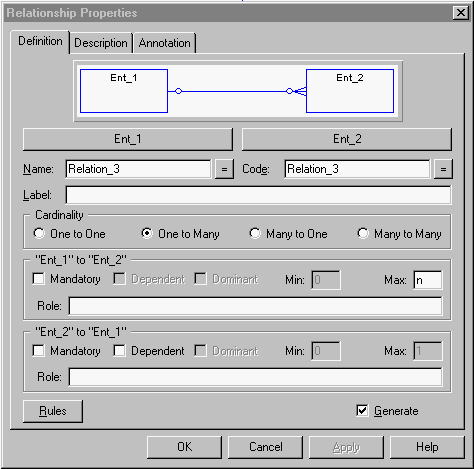
| Drawing and defining
relationships in DataArchitect
has always been one of its strongest points. Just grab
the relationship tool from the palette and drag it from
one entity to another. PowerDesigner
is sensible enough to draw a meaningful default
(One-to-Many from the first entity touched). It would be
even better if the parent were made mandatory, since 85%
or more are in most models.
DataArchitect has always lagged behind ERwin (and now ER/Studio) when it comes to dealing with multiple relationships between the same entity pair. Where the other two prompt for a distinguishing role name for the propagated foreign key, DataArchitect blindly generates the FK into the physical model with a unique prefix. It's up to the modeler to repair the physical model, either by renaming foreign key columns to something meaningful or by merging them into a single column. Another mode of defining relationships is the
super/sub-type or generalization/specialization, which DataArchitect
calls an inheritance. |
||||||
|
||||||
|
One of our favorite features
in PowerDesigner is Business
Rules. These are text objects which can be attached many-to-many
to any modeled object in ProcessAnalyst
or DataArchitect. Each rule has
separate text sections for the descriptive business
language and SQL code to be implemented in the server
(the section labeled for client code does nothing). Rule
SQL can be inserted by reference into a trigger or stored
procedure, making for modular server code construction
tied to strong model documentation. PowerDesigner's Business Rules allow top-to-bottom tracing of the source of a model concept down to its implementation by table, column, view, index, or constraint. We strongly encourage users to employ this capability to document their models more completely. Some competing tools offer a similar capability. Silverrun's actions are more structured and flexible in some ways. System Architect has a completely open meta-structure so you can define any sort of objects, including business rules and a whole lot more. Typically, PowerDesigner has packaged its Business Rules in a manner which is more evident and superficially understandable, even if not as rich for the demanding user. |
|||||
|
PowerDesigner Review | |||||
|
PowerDesigner Users' Resources for many links and documents | |||||
|
||||||
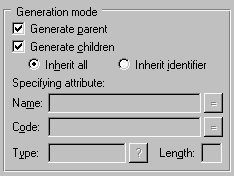 PowerDesigner
has had exceptional handling of sub-type hierarchies
since at least V3. Unlike the similar subtype structures
in
PowerDesigner
has had exceptional handling of sub-type hierarchies
since at least V3. Unlike the similar subtype structures
in