

Some skilled users had alerted us that LBMS's Systems Engineer is intimidating at first sight. Brash with the confidence of youth and broad tools experience, we clicked the LBMS tools icon with confidence and verve. Well, our friends were right. This is a big tool set - we would call it a big, ugly tool set. Nine windows contain over 50 icons (some appearing more than once) in a seemingly huge array of both novel and familiar terms. The four slender manuals shipped with the product seem barely big enough to explain these icons alone!
In fairness, Systems Engineer is far more than a data modeler cum data flow diagrammer (e.g., PowerDesigner, ERwin, System Architect). This is a complete methodology and course of instruction in how to model almost every aspect of systems design - process, data, interfaces, server side, clients, green-screens. If we had several months to absorb the product we would probably have a lot more to say - both good about the expertise delivered and bad about its obscure presentation. But this review is undertaken in a context of just data modeling so we will focus on that portion of Systems Engineer.
Like other large tools which package a lot of functionality (e.g., CASEwise, Bachman), Systems Engineer has a high overhead associated with begining work. You must deal with user setups, security logons, project and task definitions, model dialogs, and other administrative chores before you begin modeling. This reflects Systems' Engineer's substantial enterprise capabilities for managing multiple workers and projects, with all properties housed in their repository.
Don't approach this tool with urgent impatience. If you want to experience its value, you must take the time to set it up properly and define all your work thoroughly. Then you will be able to benefit from the integration of the various components for process, data, interface, and implementation.
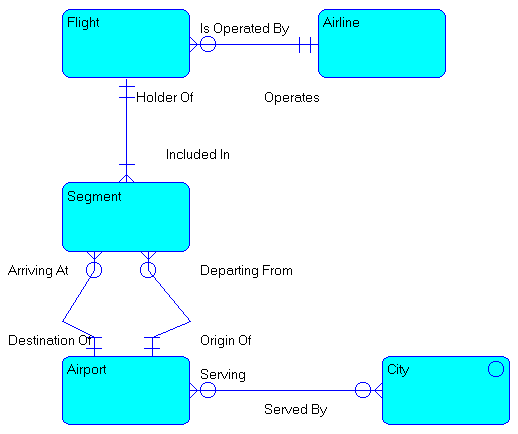
Systems Engineer provides a limitied symbol vocaulary of standard Information Engineering constructs for entities, binary relationsips, and submodel groups. It adds entity classifications as Kernel, Characteristic, Associative, or Operational Master, which influence referential integrity behavior later. We find these labelings an irrelevant but untroubling reminder of LBMS's strong methodology roots.
Relationsips are defined with standard bidirectional predicate phrases constructed with the help of a very simple and effective proto-wizard. Tools such as PowerDesigner and ERwin could improve their obscure cardinality dialogs by taking a look at Systems Engineer here. Systems Engineer does support the exclusive relationship set arc construct. Some people like arcs but we argue that they are merely lazy sub-type representations which confuse the diagram.
Sub-modeling in Systems Engineer is rudamentary. Entities can be connected with the IE sub-type symbol indicating some intention of hierarchy but we found no effective results other than documentation. In fact the help warns that sub-type entities must be (manually) converted to regular entites to be valid in a physical model. There is no facility to map upward or downward denormalization of sub- and super-types into physical tables.
In fact, the biggest disappointment to us was the apparent lack of real mutli-level modeling. Logical and physical are merely labels in Systems Engineer. The objects do not change other than in applying a target RDBMS and its specifications such as data types and triggers. This is a major step off the baseline for those of us accustomed to mutli-level modeling in Silverrun or bi-level modeling in Bachman, PowerDesigner, or IEF.
Systems Engineer follows standard IE principles in supporting a dictionary of data items which can be attached as attributes to entities. Unfortunately this is offered in a clumsy way which impedes defining data items as attributes on the fly.
Systems Engineer has a curiously convoluted approach to keys - primary, foreign, alternate, and non-unique. For a tool rooted in major methodology it manages to suprisingly muddle the meaning of identification versus indexes. The issue is further clouded in that the user must manually define key attributes and their key type.
... is tedious in Systems Engineer, especially compared to the seamless and streamlined operation of ER/1, ERwin, and PowerDesigner. The product is sloooww (on a Pentium 166 with 64MB!) and requires layers of menu and dialog navigation to get most tasks done. Many features are accessed through separate modules which must be opened from the main icon window.
Since we found the modeling surface unexciting, we had no reason to press Systems Engineer's output features for reporting, DDL, and fatabase generation to their limits - we're lazy and busy.
For data modeling at least, we rate LBMS's Systems Engineer as a tool to study perhaps but not to buy. The cost is high; the interface is backward; graphic manipulation is crude; supposedly two-level modeling is not (as far as we could tell); producing DDL and other output demands far too much juggling of unintegrated modules.
If you are looking for gurus to show you the shining path of enlightenment to traditional structured systems analysis and development, then you may find the whole of Systems Engineer attractive (albeit 20 years late). Be warned, however, that some dedicated users have characterized the move as a forced marriage involving religious conversion.
Please be sure to also read the LBMS response to this review.